
Fractal Art – Programming Assignment
Carrying on with the theme of catching up with last terms projects, I’m going to fill you in on our 1st year programming assignment. I was dreading this assignment when I started out at Bournemouth Uni – I had never done anything involving coding before so the whole idea seemed alien to me! But by the end of the term, I couldn’t get enough of it!
If you like problem solving, and seeing things in a logical way, then programming is for you. There were multiple briefs we could choose from, ranging from fractal art to lines of animated cogs. I decided to choose the fractal art brief, which involved creating a program via the use of C++ and/or Python to create a Pythagoras Tree and a Hilbert Curve. For those of you who don’t know what these are, or about fractals in general, they are a type of pattern that can repeat itself indefinably and at any scale the shape remains the same, bit weird huh? Take a look at the pictures below for a visual explanation:

Pythagoras Tree.

Hilbert Curve.
The diagrams above each show different stages of a Fractals “growth”. The first stage in both sequences starts off with the initial shape (Pythagoras is 2 squares set at angles on top of a larger square and the Hilbert starts with 3 connected lines). This shape is then repeated in some way for each of the next steps, creating a repeating (or self-similar) pattern.
There are hundreds of these fractals out there, a quick google image search will show you their endless possibilities. They can also be varied or modified dramatically. For example, you can change the angles/scale of the 2 top squares (as long as they meet to create the triangle) on the Pythagoras tree to create very different looks. They are used in computer graphics to create a natural randomness, for example terrain generators. To create them in code efficiently, you have to rely on a practice called recursion – this is where a procedure/function will end with a call to run itself again, thus repeating itself.
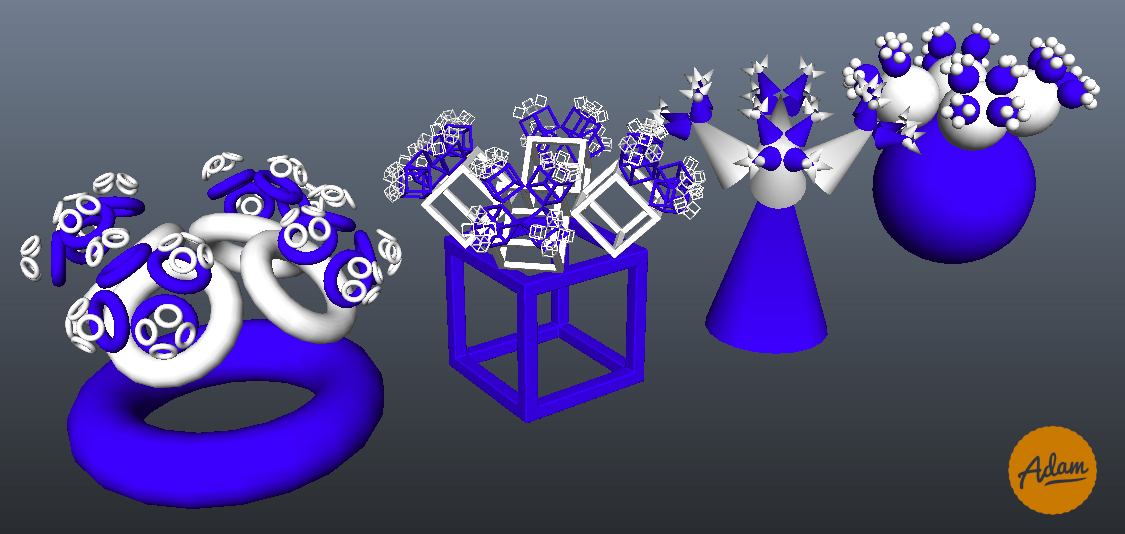
At the time I been working a lot with Python, creating my CityGen script, so I chose to use the language again for this project (if there are any 1st year CVA students reading this, in hindsight it would probably have been better to use C++, so get savvy with it ready for the 2nd year!). Most people were using a turtle library to create their fractals in 2D, but I wanted to try and create these patterns in 3D via the use of Maya’s script editor. This train of thought led to me going a little bit further with the project, pushing the fractals in even more 3D ways and also creating a GUI to help navigate and create them, as seen in the images below.
Sadly, I can’t post the code in case any new CVA/CAA students are reading this, sorry!

My first iteration of the Pythagoras tree involved using 2D planes to create the tree.

My second iteration involved the program creating the tree out of 3D cubes. This was closer to my idea of a 3D tree, yet I still felt it wasn’t quite hitting the nail on the head.

I was much happier with my final Pythagoras tree. The tree now has 4 branches instead of 2, allowing it to expand in 3D space more believably. I also coded it to allow the user to choose any shape they wanted to turn into a Pythagoras tree.

Finally we have the Hilbert Curve. Unfortunately, I didn’t have time to create a 3D Hilbert “Cube”. However, I created a system which allows you to add your own colours into an array, which the program then uses to adjust its colour.
+ There are no comments
Add yours